
Lock Your Zoom While Browsing
Zoom into a detail, then hold ⌥ Option and press ◀ ▶ (or swipe / scroll). Your zoom and position stay put, so the same spot stays framed across every shot.
Open a folder. Zoom in. Compare similar shots side by side. Pick keepers. Trash the rest. No import, no catalog.

Just Look! is a fast image viewer for Mac made for focused folder review — not building a library. It is for people who:
Review hundreds of shots after a shoot and need to move fast
Want fast culling without importing into a catalog
Need a lightweight alternative to Preview for folder review
Care about RAW and modern formats like JPEG XL, AVIF, and HEIC
From everyday JPEGs to camera RAW — open folders directly, no import. Shooting RAW? See the RAW image viewer for Mac and how to cull RAW photos on Mac.
JPEG, PNG, HEIC, TIFF, WebP, JPEG XL, SVG, OpenEXR, HDR, DDS, and TGA.
GIF, AVIF, WebP, PNG, and SVG.
Canon CR2, CR3, CRW, and DNG; Sony ARW and SR2; Nikon NEF and NRW; Fujifilm RAF; Olympus ORF; Panasonic RW2 and RAW; Pentax PEF and DNG; Leica DNG and RAW; Minolta MRW; Hasselblad 3FR and PPM; Epson ERF; Leaf MOS; Ricoh DNG; Samsung DNG and SRW; Kodak DCR; Nokia DNG; and OnePlus DNG.
Compare photos side by side or overlaid. Hold ⌥ Option to keep your zoom locked while you browse.
Zoom into a detail, then hold ⌥ Option and press ◀ ▶ (or swipe / scroll). Your zoom and position stay put, so the same spot stays framed across every shot.
Hold ⌥ with skip-10 or jump to first / last, too. Release ⌥ to return to normal fit-to-window.
⌥⌘⌫ moves the current image to Trash and keeps the same zoom on the next one — cull a burst without readjusting your view.
Overlay a neighbor with ⌥A / ⌥S and nudge it into place
Hold ⌥A to bring the previous image on top of this one, or ⌥S for the next — overlaid in the same spot so you can compare the two shots directly.
While holding, move, rotate, and zoom the overlay with the keys or trackpad to line the two shots up exactly. Just Look! remembers the alignment per image (⇧⌘0 resets it).
Press G to open Compare Grid and lay out 2 to 6 shots side by side in one window — choose between near-identical frames without stepping back and forth. See every way to compare photos on Mac.
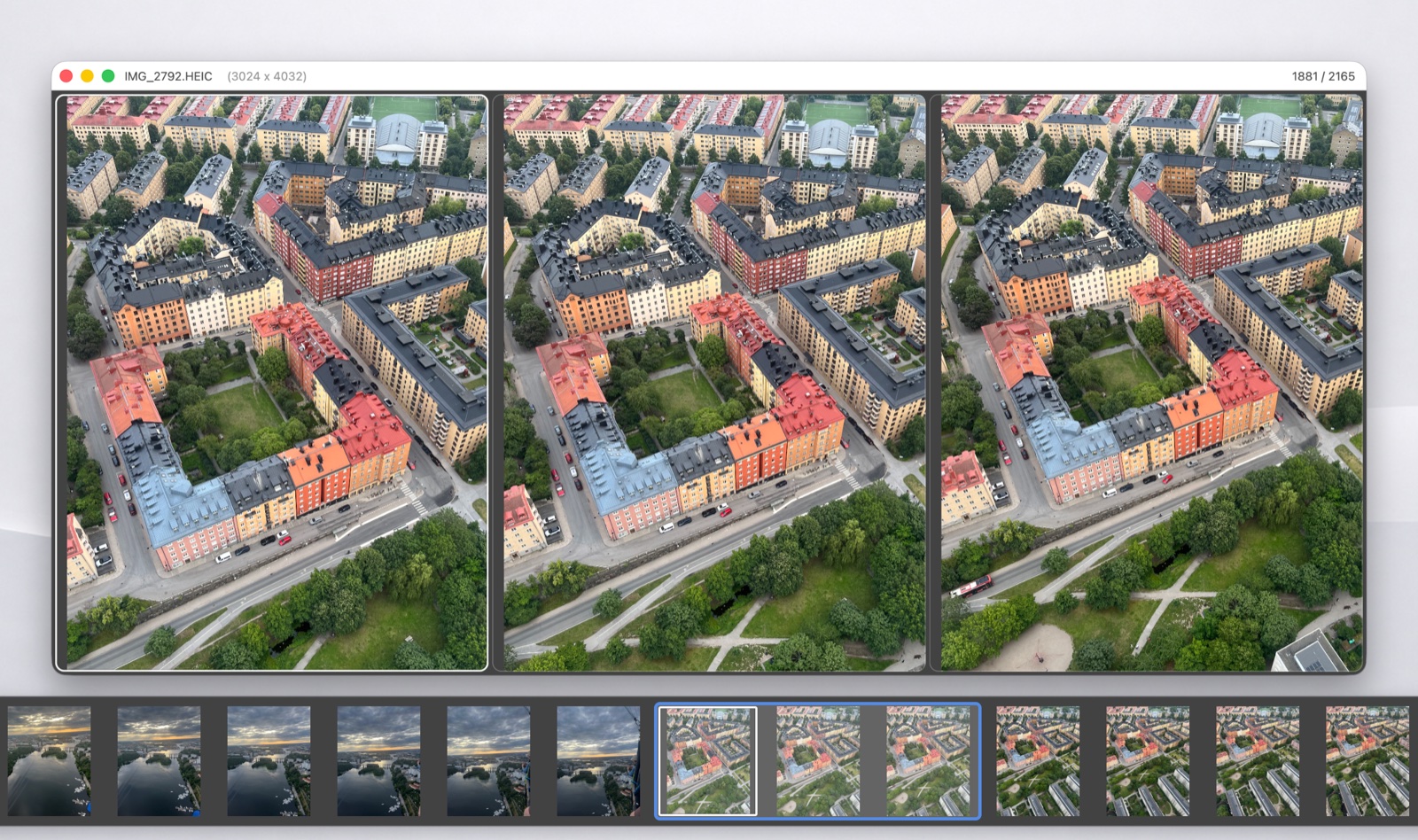
Arrow keys move through the folder, or through your picks, while the grid fills in with the next shots. The thumbnail strip marks the images on screen.
Press B to mark the focused shot as Best. It stays in the first slot while the other cells cycle past it, so every challenger faces the current favorite.
Pick 2 to 6 images from the Compare menu, or press ⌥⌘] / ⌥⌘[ to grow or shrink the grid.
Zoom and pan every cell at once to check focus on the same detail. Hold ⌥ to nudge a single cell into line — the alignment is shared with overlay compare.
Mark images you want to focus on
Mark similar shots with Space, press X to reject, press ▼ to focus on picks, then remove the extras and keep your favorite. Press ⌘/ to clear all picks.
Pick your best images, drag to reorder in the thumbnail strip, present in your order.
Use the Picks menu to gather all images with a specific star rating, so your best shots are easy to review.
Pick the keepers, then Trash Non-Picks to delete the rest. Or trash all picks — or all rejects.
Press C to frame the shot right where you're reviewing it. Choose Free, Original, Square, 4:3, 3:2, or 16:9, straighten up to 45° either way, and save back to the original file after a confirmation.
The crop box follows you to the next image, so you can frame a whole series the same way. JPEGs keep their original quality. Crop is part of Pro.
A lightweight image viewer focused on viewing and culling — no library, no import.
Open folders directly and start reviewing. Your files stay where they are.
No database to build or maintain. Just your folders on disk.
Fast zoom and navigation powered by Metal rendering on Mac.
A keyboard-driven image viewer: navigate, zoom, rate, tag, and export without leaving the keyboard.
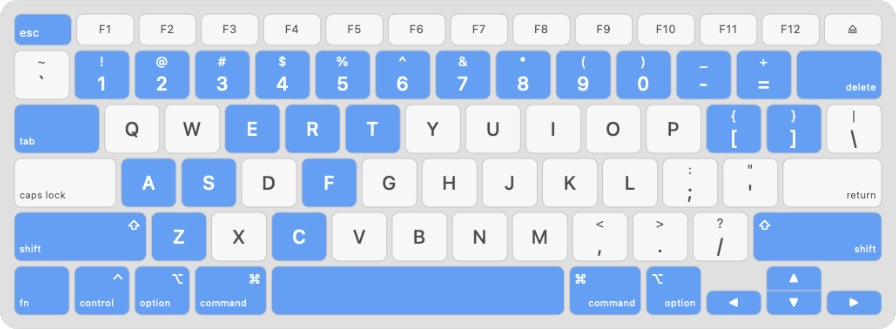
Organize the folder you're reviewing without a separate catalog. Rate with 1–5 as you scan, press X to reject, apply Finder color tags with ⌃1–9, and see stars in the thumbnail strip as you move.
Focus by rating — gather every 3-star image (or any star count) into Picks for a quick second pass.
Batch cleanup — when you're done culling, trash everything rated 2 stars and below, or trash all rejects, in one step.
Tags and ratings are written to the file — the same colors and stars show up in Finder, so your organization travels with the photos. Pro can also write ratings, pick/reject marks, and tags to XMP — in sidecars, or embedded in JPEG and DNG files.
Everything you need to review and organize a folder — fast.
Metal-accelerated viewing keeps navigation responsive — browse large folders without stutter or UI lag.
Monitors the open folder for new files, deletions, and renames — the strip updates in real time.
A RAW and JPEG that share a name appear as one image — rate, tag, pick, and trash both together.
Press ⇥ Tab to expand thumbnails into a full-window gallery — scan hundreds of shots at a glance, navigate with arrow keys, and double-click to review.
Hold ⌥A / ⌥S to overlay the previous or next shot, then fine-align move, rotate, and zoom — alignment is remembered per image.
Rotate with [ / ] without losing bit depth, format, or metadata — RAW and DNG rotations can go to an XMP sidecar.
Right-click the image, a thumbnail, a Gallery cell, or a Compare cell for the actions that fit it.
While you review one image, nearby shots load ahead so the next frame appears immediately.
Sort like Finder — by name, kind, date, size, or dimensions. Press ⌃⌥⌘1–7 to switch sort criteria.
Open a folder, cull your shots, press Esc — done.
Pick your best shots and drag them into any order for a presentation or client review.
Set format and quality once, then export with ⇧1–3 — no dialog every time.
Rate 1–5 on the keyboard as you scan, or press X to reject — built for fast culling passes.
No toolbar clutter or overlapping panels — the image owns the window.
Inspect camera settings, dimensions, and file details — read-only, without breaking your review flow.
Click the title bar or press ⇧⌘R to reveal the current image in Finder.
Place the window on screen edges or corners — integrates with the macOS window alignment system.
View images instantly at full quality — no pixelated thumbnails stretched to fit the window.
Pick up where you left off — open your last folder, last file, or a default folder on launch.
Unlock faster sorting, metadata tools, organization controls, and advanced image workflow features. Every Pro feature is free for 30 days, starting the first time you open the app.
$1.99
per month, auto-renews
$9.99
per year, auto-renews
$19.99
pay once, keep forever
US prices. Local prices are set by the Mac App Store and may vary. The free features keep working if you never buy Pro.
Create, recolor, and manage tags directly in your image workflow.
Rename the current image without leaving your review.
Sort by name, kind, date, size, and dimensions.
Write ratings, pick/reject marks, and tags to XMP sidecars or embedded in JPEG and DNG.
Crop and straighten images without leaving your review session.
Delete images by rating, reject flag, or focus, in a single step.
Recover quickly when organizing large folders under time pressure.
Save custom format and quality presets for one-click image export.
Unlock advanced options for launch, HUD, color, and confirmations.
Quick answers about the free version, Preview, formats, and how comparing works.
Yes. Just Look! is a free download from the Mac App Store. Viewing, keyboard browsing, Compare Grid, overlay compare, Picks, reject flags, and star ratings are free. Just Look! Pro adds batch cleanup, XMP writing, tag editing, crop, undo, rename, sorting, and export presets. It comes with a 30-day free trial that starts the first time you open the app, then costs $1.99 a month, $9.99 a year, or $19.99 once for lifetime access (US prices).
Yes, for folder review. Preview opens one file at a time; Just Look! opens the whole folder, moves between shots with the arrow keys, keeps your zoom locked while you browse, and lets you rate, pick, and trash as you go. If you have been looking for a Pixea or Xee alternative with modern format support and side-by-side compare, it fits that role too.
Yes. Just Look! opens RAW files from Canon, Sony, Nikon, Fujifilm, Olympus, Panasonic, Pentax, Leica, Hasselblad, and more, plus DNG, HEIC, JPEG XL, AVIF, WebP, TIFF, PNG, and JPEG. See the full format list. A RAW and JPEG with the same name are shown as one image, so you can rate, tag, pick, and trash both together.
No. Just Look! opens folders directly. There is no import step and no catalog to build or maintain. Your files stay where they are on disk, and ratings and Finder color tags are written to the files themselves.
Press G to open Compare Grid, which shows 2 to 6 shots side by side in one window. Press B to pin the best shot while the other cells cycle past it. You can also hold ⌥ Option while browsing to keep the same zoom and position across every shot, or hold ⌥A / ⌥S to overlay the previous or next image on top of the current one. For a step-by-step walkthrough, see photo culling on Mac.
Just Look! requires macOS 12 Monterey or later and is available only from the Mac App Store. The current version is 1.2.
Yes. Star ratings and color tags are written to the files, so the same stars and colors show up in Finder. Just Look! Pro can also write ratings, pick and reject marks, and tags to XMP, either as sidecar files or embedded in JPEG and DNG, so other apps that read XMP metadata can pick them up.
Open a folder and cull with confidence.